
How to Upgrade Your Mailbox in Your Online Account
You can easily upgrade your mailbox size through your Mweb Online Account. The change is quick and takes effect immediately after confirmation.
Why Upgrade Your Mailbox?
More space means:
- No more “mailbox full” messages
- Space for attachments and important emails
- Less time cleaning up your inbox
Simple upgrade. Better experience.
-
Log in to your Online Account
Go to http://my.mweb.co.za and sign in with your details.
-
Go to All Services
From the left-hand menu:
My Services > All Services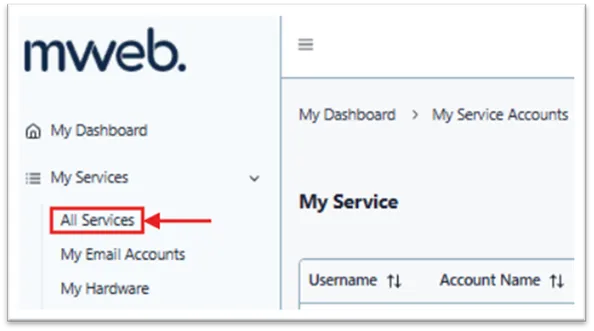
-
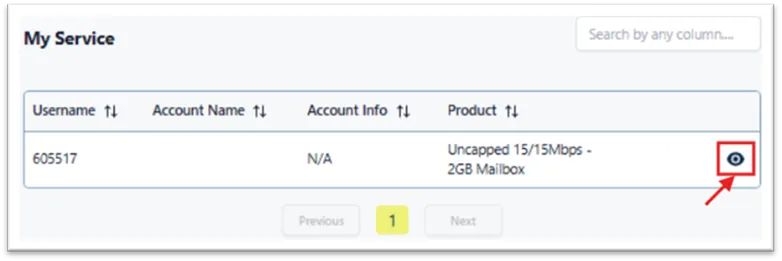
Open your service details
Find your product and click the eye icon to view more details.
-
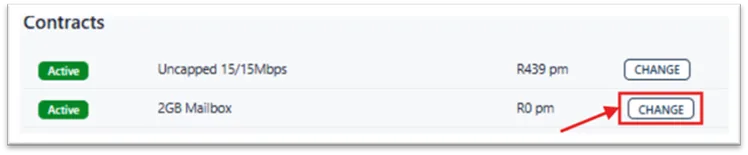
Select your mailbox
Under Contracts, locate your mailbox and click Change.
-
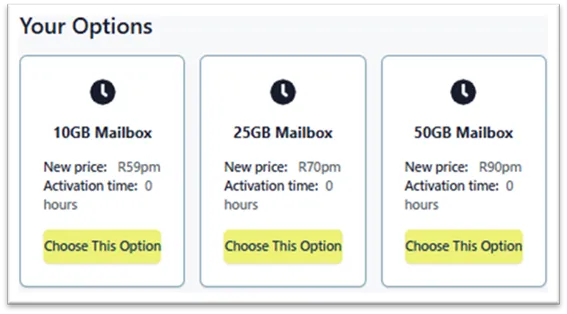
Choose your new mailbox size
Pick the option that suits your needs:
- 10GB
- 25GB
- 50GB
Click Choose This Option to continue.
-
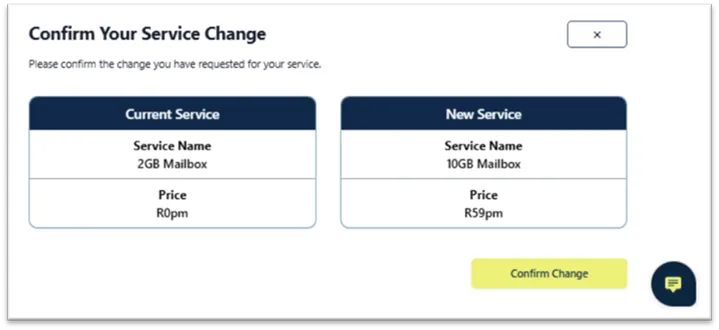
Confirm your upgrade
You’ll see a summary of your current and new mailbox.
Click Confirm Change to proceed.
-
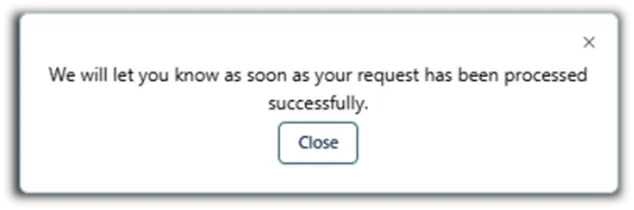
Done
A confirmation message will appear once the upgrade is successful.
Your new mailbox is ready to use immediately.
- Your upgrade is instant
- New pricing applies from your next bill
- You can upgrade again anytime
Was this article helpful?