
MyMweb Rewards: Refer & Earn With Mweb Fibre or LTE
Earn cash by referring friends, family, or clients to Mweb Fibre or Fixed LTE.
With MyMweb Rewards, you simply share your unique referral link and get rewarded when someone signs up and activates a service.
No joining fees. No setup. Just share and earn.
What Is MyMweb Rewards?
MyMweb Rewards is Mweb’s referral programme available to existing customers.
Once activated, you’ll receive a unique referral link. When someone signs up using your link and their service becomes active, you earn commission.
You earn:
- R300 per successful Fibre or Fixed LTE referral
- Commission is paid once the service is active
How to Activate MyMweb Rewards
-
Log in to Your Online Account
Go to: https://my.mweb.co.za
Log in using your Mweb account details.
-
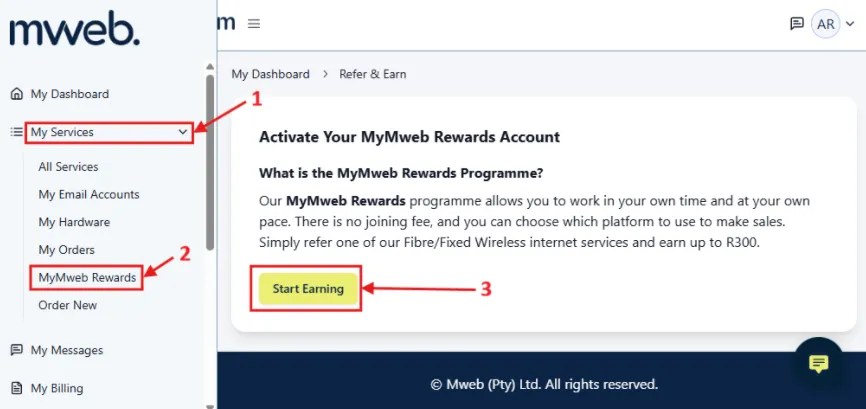
Open MyMweb Rewards
From the left-hand menu, select:
My Services → MyMweb RewardsClick Start Earning.
-
Activation in Progress
Once you click Start Earning:
- Your request is submitted for activation
- You’ll see a confirmation message
- Activation can take up to 15 minutes
Close the message and allow a few minutes for processing.
-
Access Your Rewards Dashboard
Log out and back in after activation.
Go to:
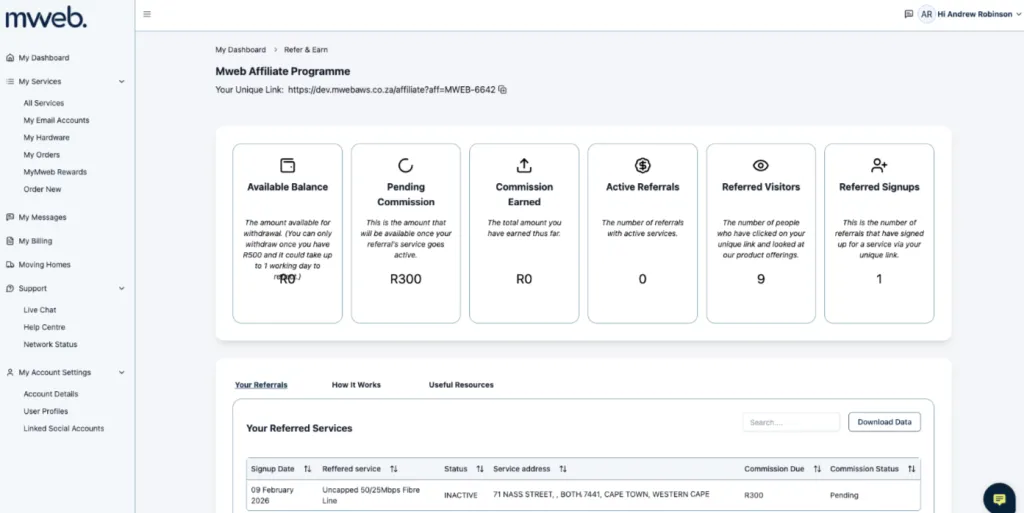
My Services → MyMweb RewardsYou’ll now see your dashboard.
From here, you can view:
- Your unique referral link
- Available balance
- Pending rewards
- Total rewards earned
- Active referrals
- Referral activity and tracking
You’re ready to start earning.
Welcome Email Confirmation
Once activated, you’ll receive a welcome email confirming your account is live.
This email includes:
- A link to your Online Account
- Confirmation of activation
- Reward details
- Payout information
If you don’t receive it, check your spam or junk folder.
How to Start Earning
- Copy your unique referral link from your dashboard
- Share it with friends, family, or clients
- When someone signs up and activates, you earn
- Track everything in your dashboard
Simple. The more you share, the more you earn.
When Do I Get Paid?
- Rewards reflect once the referred service becomes active
- Your available balance may take up to 1 working day to update
- You can track pending and available rewards in your dashboard
Full payout details are available inside your dashboard.
Need Help?
If you can’t activate MyMweb Rewards or access your dashboard:
- Log out and back into your Online Account
- Wait at least 15 minutes after activation
- Clear your browser cache or try another browser
Still stuck? Contact Mweb Support via Live Chat.
Was this article helpful?