
Step-by-step instructions to setting up your Media Box from Mweb
Follow the easy step - by - step set up instructions below. If you need some extra help give the Media Box team a call on 0861 00 2236
Step 1: Open the box and you will find the following included:
1.Media hub with preinstalled software
2.Remote control
3.HDMI cable
4.Power adapter
5.User guide
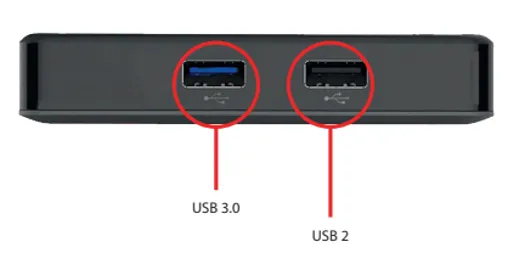
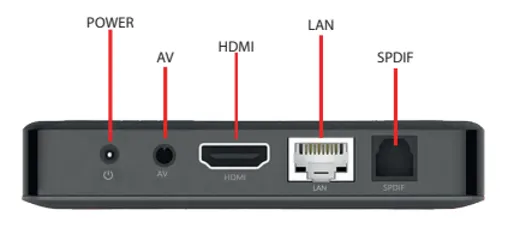
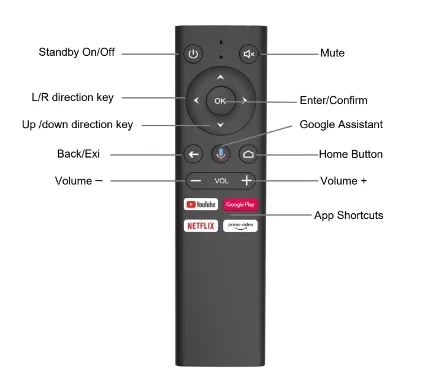
Step 2: Getting to know your Media Box
Side Panel
Rear Panel
Remote Control
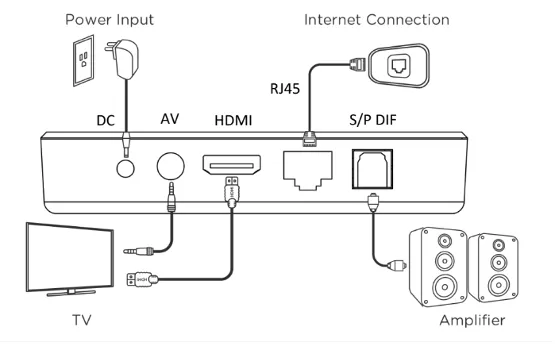
Step 3: Setting up your Media Box
Before connecting, please shut down all the equipment to be connected.
- Connect the Media Box to your TV.
- Connect the HDMI/AV cable to the HDMI/AV port of the Media Box and TV set
- Connect to your network.
- Plug the Ethernet cable to the LAN port of the TV box and the other side of the cable to the LAN port of your router
- Connect the Media Box to the power outlet
- Before powering on. Please switch the signal input of the TV to the HDMI source that you plugged the Media Box into
- Start streaming!
- Connect the Media Box to your TV.
Was this article helpful?